THE CATALOG MOVES. THE UI MOVES WITH IT.
Image and video models arrive from OpenRouter at runtime.
 OpenGen UI
IMAGE + VIDEO GENERATION FOR MAC
One sharp workspace that turns OpenRouter's live model catalog into the controls each model actually supports.
Universal · Apple Silicon + Intel · Beta
01 / 04
Pick a model. OpenGen UI reads its capabilities live, keeps unsupported fields out, and shows the exact JSON before anything leaves your Mac.
Image and video models arrive from OpenRouter at runtime.
References, frames, ratios, seed, and provider options appear only when supported.
Inspect sanitized JSON without leaking large base64 bodies or your key.
02 / 04
Select an image or video model from the live catalog.
Write the prompt and use only the controls that fit.
Inspect the payload, send it, and keep long-running video jobs alive.
03 / 04
Your OpenRouter API key is stored in a permission-restricted local file. Requests pass through the native Rust process, and the key is kept out of previews and logs.
~/.open-gen-ui/credentials.json
READ THE SECURITY NOTES ↗04 / 04
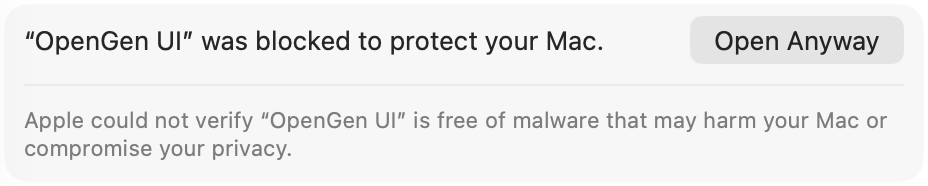
OpenGen UI is distributed without Apple notarization. macOS will ask you to approve it once.
AFTER THE FIRST BLOCK
Go to System Settings → Privacy & Security. This panel appears in the Security section after macOS blocks the first launch.
IN-APP UPDATES FROM 0.2.0
Install 0.2.0 once, then OpenGen UI checks for signed updates whenever it starts.
Your API key stays in ~/.open-gen-ui, outside the app bundle, so updating does not remove it.
DOWNLOAD THE LATEST DMG↓